

Ever got a notification that says “John emphasized ‘See you at 8′” and had absolutely no idea what that meant? You’re not alone. The word emphasize has taken on a whole new meaning in the world of modern texting, and it confuses a lot of people especially when switching between different devices or messaging apps.
Whether you’re an iPhone user, Android user, or somewhere in between, understanding what does emphasize mean in text can save you from a lot of awkward misunderstandings. This complete guide breaks down every meaning, every platform, and every emoji so you’ll never be confused again.
What Does Emphasize Mean in Text?
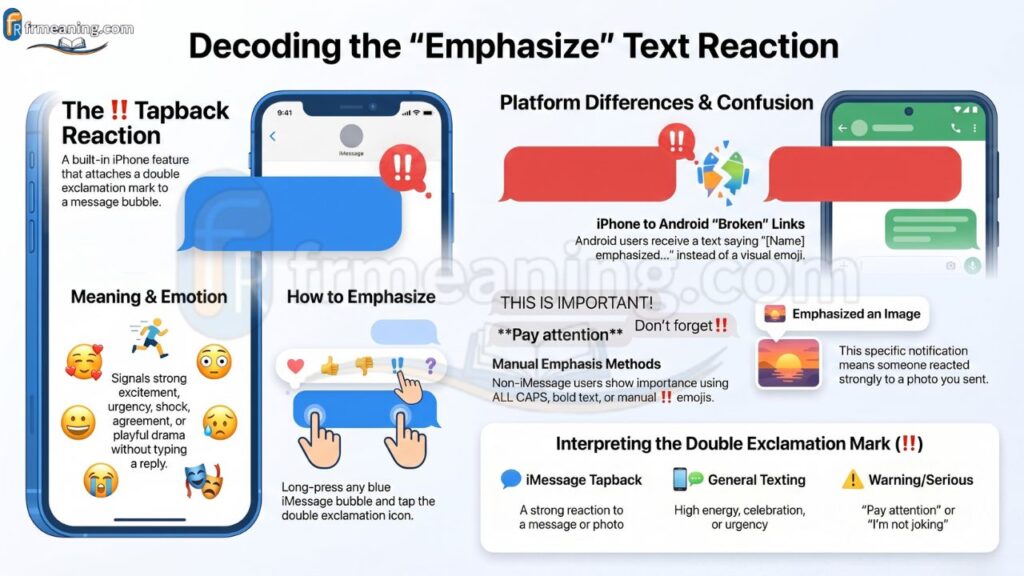
Emphasize in text means to strongly react to, highlight, or draw special attention to a message. On iPhone’s iMessage, “Emphasize” is a specific Tapback reaction that attaches a double exclamation mark (‼️) to a message bubble. Outside of iMessage, emphasizing something in a text simply means the sender is stressing the importance of what they’re saying.
So depending on where you saw the word, it could mean two very different things — a built-in feature reaction or just a way of saying “this is really important.”
What Does Emphasize Mean in Text on iPhone?
On an iPhone, the word “Emphasize” has a very specific and literal meaning inside iMessage. It refers to one of Apple’s built-in Tapback reactions — quick responses you can attach to any message bubble without typing a full reply.
When someone uses the Emphasize Tapback on your message, you receive a notification that reads:
“[Name] emphasized ‘[your message]'”
This is iMessage’s way of telling you that someone reacted strongly to what you said. The Emphasize reaction triggers the label “Emphasized [your message]” as a notification directly to the sender.
The 6 iMessage Tapback Reactions
iMessage currently offers six Tapback reactions. The Emphasize reaction sits right alongside:
- ❤️ Love
- 👍 Like
- 👎 Dislike
- 😂 Laugh
- ❗ Exclamation (Question mark)
- ‼️ Emphasize ← this one
The Emphasize Tapback is visually represented by the double exclamation mark emoji (‼️), which signals strong emotion, urgency, excitement, or importance. It’s basically the digital equivalent of someone shouting “WOW!” or “YES!!” in response to your message.
How to Emphasize a Text on iPhone
Emphasizing a message on iPhone is super simple and takes about two seconds:
- Open the Messages app
- Find the message you want to react to
- Press and hold the message bubble
- A row of reaction icons will appear above the bubble
- Tap the ‼️ (double exclamation) icon
- The reaction is now attached to the message
Important: This feature only works in iMessage conversations (blue bubbles). If you’re texting someone on a green bubble (SMS), the Tapback feature won’t work the same way — more on that in a bit.
What Does Emphasized Mean When You Receive It?
When your iPhone shows you “Sarah emphasized ‘I’ll be there at 6′”, it simply means Sarah long-pressed your message and tapped the ‼️ reaction. She didn’t type anything — she just used the Emphasize Tapback to show a strong reaction.
What does “emphasized” mean emotionally? It usually signals one of these feelings:
- Strong excitement — “That’s amazing!”
- Shock or surprise — “No way!”
- Agreement — “Absolutely, yes!”
- Urgency — “This is serious!”
- Playful drama — “OH WOW.”
It’s a quick, expressive reaction that carries more weight than a simple “like” but doesn’t require the person to type out a full response.
What Does Emphasized an Image Mean?
A lot of people search specifically for what does emphasized an image mean — and honestly its a very fair question because it sounds a bit different from reacting to a text bubble.
“Emphasized an image” means someone used the ‼️ Tapback reaction on a photo you sent in iMessage. Instead of replying with words, they attached the double exclamation reaction directly to the image bubble.
What Does Emphasize an Image Mean on Text?
If you send a photo and see “[Name] emphasized an image,” it means the person:
- Found the photo impressive or shocking
- Wanted to express a strong emotional response
- Didn’t have words for it — the ‼️ said it all
- Loved or was amazed by what you shared
So what is emphasized an image? It’s essentially a high-energy, wordless compliment or strong reaction to a picture you sent. Same feature, same emoji — just applied to a photo instead of a text message. The meaning behind it is identical: strong emotion, strong attention.
What Does the Emphasize Emoji Mean?
The emphasize emoji is the double exclamation mark: ‼️. This emoji represents intensity, urgency, and high emotion. But its meaning can shift slightly depending on how and where its being used.
Emphasize Emoji Text Meaning — 8 Key Interpretations
Here’s a breakdown of what does the emphasize emoji mean in different texting contexts:
| Context | What ‼️ Signals |
|---|---|
| iMessage Tapback | “Emphasized” — strong reaction to a message or image |
| General texting | Urgency or importance (“Do this NOW‼️”) |
| Excitement | High energy or celebration (“We won‼️”) |
| Shock | Disbelief or surprise (“No way‼️”) |
| Agreement | Strong yes or confirmation |
| Warning | “Pay attention to this” |
| Playful drama | Sarcastic or exaggerated reaction |
| Serious reminder | “I’m not joking about this” |
The emphasized emoji in iMessage is a system-level feature, but in regular texting on any app, people use ‼️ manually to add the same emotional weight to their words. So whether someone sends you “emphasized your message” or just types “‼️”, the vibe is largely the same — this matters, pay attention.
What Does Emphasize Mean in Text on Android?
Here’s where things get a little different. Android does not have a native “Emphasize” Tapback feature the way iPhone does. So what does emphasize mean in text on Android? It depends entirely on which app you’re using and whether your device supports RCS messaging.
How RCS Changes Everything on Android
RCS (Rich Communication Services) is Android’s upgraded messaging protocol that brings iMessage-like features to Google Messages. When both people have RCS enabled in Google Messages, they can react to messages with emoji — similar to iMessage Tapbacks.
However, Android’s RCS reactions don’t use the word “Emphasize” the same way Apple does. Instead, users pick from a set of emoji reactions. So the concept exists, but the branding is different.
How to Emphasize a Text on Android
Since Android doesn’t have a built-in “Emphasize” button, users create emphasis manually. Here’s how people do it:
- ALL CAPS — “PLEASE READ THIS”
- Repeated punctuation — “Are you sure??!!”
- Bold text (in apps like WhatsApp or Telegram) — this part matters
- Emojis — using ‼️ or 🚨 to draw attention
- Repeating the key point — “I’m serious, I really mean it”
- RCS emoji reactions in Google Messages (if enabled)
So what does emphasize mean in text Android is less about a feature and more about a communication style. People on Android emphasize things through creative formatting and punctuation rather than a single tap.
Cross-Platform Confusion: What Happens Between iPhone and Android?
This is one of the biggest gaps most articles completely ignore — and honestly, its one of the most important things to understand.
When an iPhone user sends a Tapback reaction to an Android user (green bubble / SMS), the reaction does NOT appear as an emoji. Instead, the Android user receives a plain text message that reads something like:
“Liked ‘your message'” “Emphasized ‘your message'”
This is because SMS doesn’t support rich reactions. The iMessage Tapback feature is exclusive to iMessage (blue bubble) conversations only, not SMS (green bubble). So if your iPhone friend “emphasized” your message and you’re on Android, you might get a weird text that just says “Emphasized ‘Ok cool'” — and now you know exactly what that is.
This cross-platform issue causes a surprising amount of confusion, and it’s worth knowing so you don’t mistake a reaction notification for an actual typed message.
Emphasize Meaning Outside of iMessage — General Texting
Not every use of the word “emphasize” in a conversation is about the iPhone feature. Sometimes people just use the word in normal conversation to stress a point.
In general texting, “emphasize” means to highlight, stress, or draw serious attention to something being said. For example:
- “I want to emphasize — the meeting is at 9 AM, not PM.”
- “Let me emphasize this again: don’t forget your passport.”
- “I can’t emphasize enough how important this deadline is.”
In these cases, the person isn’t using any app feature. They’re just speaking seriously and making sure you don’t miss the important part. This is close to the traditional dictionary meaning — to give special importance or prominence to something.
Emphasise vs Emphasize — Which Spelling is Correct?
Quick but important side note here. You might’ve seen both spellings — emphasize and emphasise — and wondered if one of them is wrong.
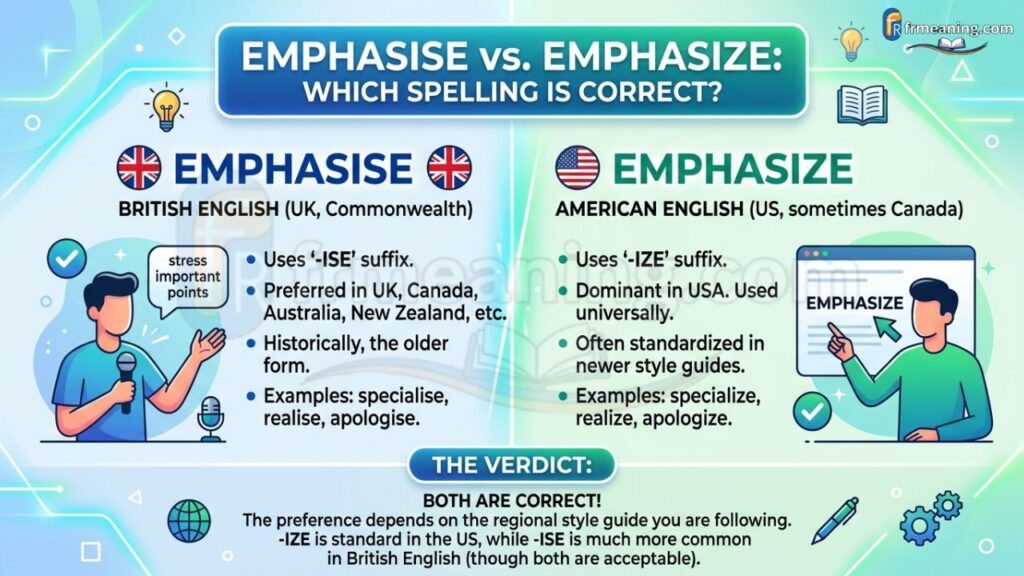
Both spellings are 100% correct. The difference is purely regional:
- 🇺🇸 American English → Emphasize
- 🇬🇧 British English → Emphasise
Same meaning, same pronunciation, just different regional conventions. So if you’re writing for a global audience, stick with “emphasize” for broader SEO reach since American English dominates most search queries.
Platform-by-Platform Breakdown: How Emphasize Works Everywhere
Different apps handle emphasis in completely different ways. Here’s a quick rundown so you’re never caught off guard:
iMessage (iPhone) The only platform where “Emphasize” is a literal, named feature. Long press → tap ‼️ → done.
WhatsApp No Tapback-style “Emphasize” button. Users emphasize manually with bold (*text*), CAPS, or the ‼️ emoji. WhatsApp bold formatting functions as the equivalent of iMessage’s Emphasize Tapback in cross-platform chats.
Instagram DMs Reactions use emoji hearts and other icons. No “Emphasize” label exists, but users drop ‼️ manually.
Snapchat No message reaction system with an Emphasize option. Emphasis is shown through emojis, caps, or dramatic punctuation like “NO WAY‼️‼️”
Telegram Supports custom emoji reactions. Users can manually pick ‼️ or any high-energy emoji to emphasize a message.
Facebook Messenger Has a thumbs up and emoji reaction system but no specific “Emphasize” label. Manual emphasis is common.
Workplace apps (Slack, Teams) Emphasis is done through formatting: bold, italics, or phrases like “Action required” or “Important reminder.”
What Does Mean on iPhone Text? (The ‼️ Symbol Explained)
If you see the ‼️ symbol attached to a message in iMessage, it means someone used the Emphasize Tapback on that specific message bubble. That’s it — no hidden meaning, no drama. It’s just Apple’s way of showing a strong reaction.
If you see ‼️ typed out in a regular text (not attached to a bubble), it’s the sender’s way of adding urgency or intensity to their words. Both uses communicate the same core emotion: this is important, this is intense, pay attention.
FAQ
What does it mean when someone emphasizes your message on iPhone?
It means they reacted with the ‼️ Tapback — showing strong excitement, urgency, or agreement with what you said.
What does “emphasized an image” mean in iMessage?
Someone reacted strongly to your photo using the ‼️ Tapback instead of typing a reply.
What does emphasize mean in text on Android?
Android lacks a native Emphasize feature, so users stress points using ALL CAPS, bold text, or ‼️ emoji manually.
Does the Emphasize Tapback work in green bubble (SMS) chats?
No. iMessage Tapbacks only work in blue bubble iMessage chats; Android users receive a plain text notification instead.